Hiển thị các bài đăng có nhãn Turorials. Hiển thị tất cả bài đăng
Hiển thị các bài đăng có nhãn Turorials. Hiển thị tất cả bài đăng
Thứ Bảy, 13 tháng 6, 2015

Thứ Ba, 5 tháng 5, 2015
How to download an application not available in your country
Chủ Nhật, 3 tháng 5, 2015
How to download facebook video to your smartphone ?

Here's how to download a video from Facebook to your smartphone.
MyVideo Downloader for Facebook is undoubtedly the most useful application to download.
For this:
- Download Application MyVideo Downloader for Facebook
- Launch Application
- Identify your facebook account
- Click the left tab.


You then have the choice between on the only access videos you've already like, those of your friends, to those pages you like, with those groups to which you subscribe or those of news feeds General.


Find the video you want and download
Thứ Ba, 7 tháng 4, 2015


Thứ Năm, 2 tháng 4, 2015
نقل البرامج الى الذاكرة الخارجية للجيلي بين

قمت بشراء هاتف مع قدرة تخزين منخفضة؟ قمت بشراء الهاتف مع 4 GB سعة تخزين الداخلية؟
قمت بشراء هاتف لا يمكنك من نقل التطبيقات إلى بطاقة الذاكرة الرقمية
المؤمنة؟
تريد تثبيت تطبيقات على بطاقة الذاكرة
الرقمية الخارجية ؟
تريد حفظ التطبيقات الخاصة بك على بطاقة الذاكرة الخارجية؟
تريد نقل التطبيقات إلى بطاقة الذاكرة الخارجية؟
لديك هاتف ذكي مع جيلي ببن؟
لديك هاتف ذكي يعمل بالأندرويد 4.1، 4.2
فقط قم بتنزيل GL to SD
هاتفك يجب أن يكون روت
قم باتباع هذا الشرح .. إذا كان أي شيء غير واضح، لا تتردد في الاتصال بي في صفحة الفيسبوك الخاصة بي .. حظا سعيدا
Chủ Nhật, 29 tháng 3, 2015
How to capture a time lapse with your smartphone ?
 Time-lapse photography is a technique whereby the frequency at which film frames are captured (the frame rate) is much lower than that used to view the sequence. When played at normal speed, time appears to be moving faster and thus lapsing.
  For example, an image of a scene may be captured once every second, then played back at 30 frames per second; the result is an apparent 30 times speed increase. Time-lapse photography can be considered the opposite of high speed photography or slow motion.
 The best apps now to make great time-lapse is
Lapse It
It will allow as much shooting as the device can hold, and if you experience some shake or unexpected interruptions like people waking in front of the shot, you can simply keep going and trim out the time leading up to the problem.
You can shoot as fast as 10 frames per second, although that's not recommended for longer periods, as the sheer amount of data creates a longer rendering process with little advantage, and has a tendency to create confusion on playback for the device.
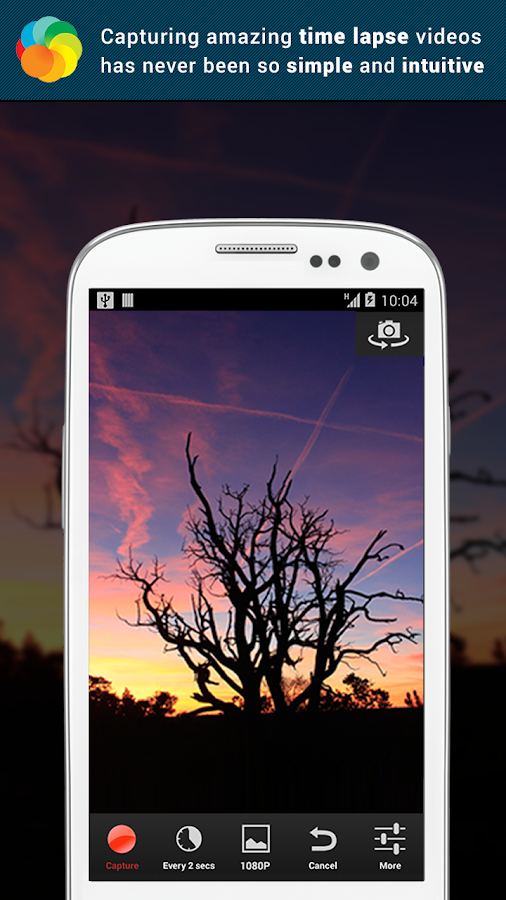
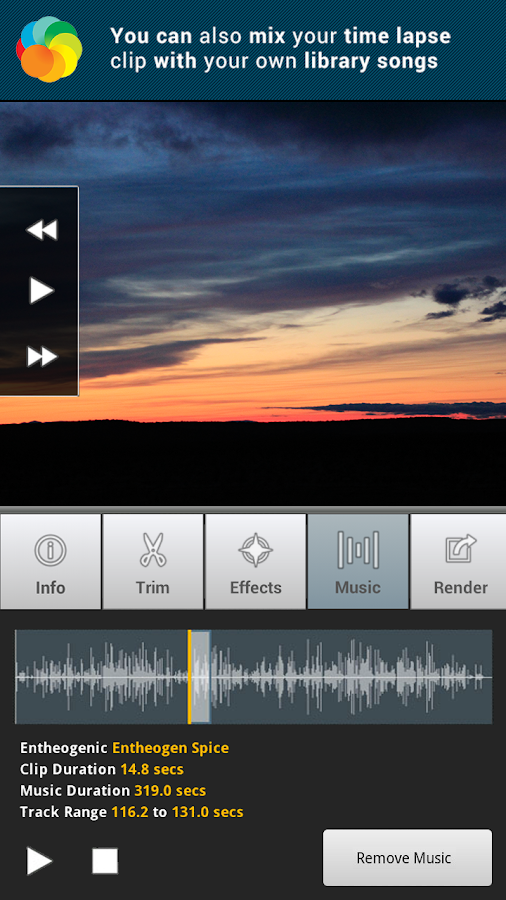 Along with trimming, Lapse It allows a few nice light filters to enhance the image and allows multiple exports of your original image batch so you can fine tune and get the desired result. It even can add music from your collection.
Note that a free version is available for trying out the app, but
it shoots lower-resolution images.
Tutorial
Thứ Ba, 24 tháng 3, 2015
Charge your smartpone faster
Why do I recharge my battery every day?
 In these days, there's no more nokia 3310 which lasts a week! We have to charge our phones every day at least once. This is not due only to the horrible consumption of mobile data or Wi-Fi, but also to other factors which are:

 Recharge your smartphone in good catches of electrics, again, it is not recommended to use the USB ports of your PC to recharge smartphones.
 In these days, there's no more nokia 3310 which lasts a week! We have to charge our phones every day at least once. This is not due only to the horrible consumption of mobile data or Wi-Fi, but also to other factors which are:
 * Leave the phone in standby
* The Google applications in the background
* Recent applications * Excessive brightness
* Apps using much RAM
The solution?
In fact, there are no exact solutions so that we do not charge our battery more than once a day, but we can extend the life of the battery, or even lengthen the duration of each recharge, so that we may at least charge the battery overnight to another (: p).
Indeed, we will opt for simple and easy tips:
The charger:

We need to recharge our smartphones with chargers provided by default supplier, or an original charger for our model. Do not use chargers from other brands only in urgent cases.
Source:
 Recharge your smartphone in good catches of electrics, again, it is not recommended to use the USB ports of your PC to recharge smartphones.
Recents apps:
Close all energy-intensive applications and RAM.
Do not touch your smartphone:
It is imperative that the use of their smartphones during recharging weakens the capacity of the battery, on any use of mobile or wifi data. It is recommended that you put your smartphone in airplane mode.
Finally, we also recommend you to buy a Powerbank for urgent cases in your days. A more 5000mAh Powerbank is very useful for you will not see the state or the percentage of the battery.
Thứ Ba, 17 tháng 3, 2015
How to unbrick HTC Desire 310 dual/uni SIM ?

You smartphone is bricked ?
Yes ! Your htc desire 310 is bricked ?
You threw your phone in the trash?
You lost the hope to fix it?
You tried to install an unknown source application? and it spoiled the phone?
Today I have the solution for you my brother ..
(Remember that this will remain your own risk. Neither our page and the author of this article shall not be held liable for any damage to your device)
What you need for this guide:
1. SP-FlashTool (version designed for our phone, please do not use another version!):
2. Stock ROM:
* UNI SIM
* DUAL SIM
3. Drivers
Step 1: Prepare for SP-FlashTool
1. Create a new folder on the C: drive called SP-FlashTool. Extract the contents of the SP-FlashTool.
2. ROM folder searching in the archives of the Stock ROM -em (HTC Desire 310 blah blah blah -> UserMode -> ROM) and unpack it to the root folder of the SP-FlashTool.

Step 2: Install the drivers:
1. Turn off the phone. When it's off, connect the USB cable to the computer, but do not start the cell!
2. When the screen displays your battery charge level (percent) disconnect it.
3. Enter the Device Manager, select View, then Show hidden devices.
4. Other devices should appear MTK65XX Preloader, right-click on it and update the driver.
You might be interested in
Download Youtube videos from your smartphone with Tubemate
Step 3: Prepare for flashing:
1. Start flash_tool.exe with administrator rights.
2. Select Options and then Option ..., or press CTRL + O combinations.
3. Go to the Connection tab, and select the option: High Speed and w / o battery.
4. Go to the tab and select the option Download DA DL All with checksum and exit from the options menu.
Step 4: Flashing:
1. Go to the Download tab.
2. Press the Download Agent and choose DA_SWSEC.bin.
3. Press the Scatter-loading and choose MT6582_scatter_1.01.862.1.txt for UNI SIM, and MT6582_scatter_1.00.1136.5.txt for DUAL SIM in the ROM folder and look forward to the appearance of the file list.
4. Under the name of the scatter-loading File drop-down menu, we have. We develop them and select Download Only.
5. Uncheck Preloader
Finally, it should look like this:

6. After checking that all is well done, press the button that says Download and green an arrow pointing down.
7. Turn off the phone and pull the batteries.
8. Connect the USB while holding the volume button is responsible for volume down! (VERY IMPORTANT!). When you begin to flash, you can let go of the button.
Wait patiently.
Congratulation, you have a new phone again
FAQ - OR DOES NOT WORK !! HOW TO REPAIR ?!
Q: I have a strange name for the internal memory!
A: So far I do not know what it may be due. The problem should not cause problems, it can only look bad from the point of aesthetic.
Q: It annoys me that error CID! You can delete it?
A: The Russians agreed that sometimes the only thing that can work is to enter the code # 243 # on the keypad. At the moment there is no other way.
Q: I can not install the drivers for Windows 8 / 8.1!
A: ANSWER
Q: I get an error IMEI / I can not send or receive calls / sms / I have no coverage at all!
A: All the problems come down to one reason: you have selected Preloader. There is as yet no solution.
Do not forget to comment if needed, or if repair success .. Thanks ..
Source
Thứ Ba, 3 tháng 3, 2015
Download Youtube videos from your smartphone with Tubemate

Now you can download Youtube videos with your smartphone via
the great application Tubemate in its last version.
So enjoy it my friends..
You might be interested in
Change your facebook apps color
Thứ Tư, 25 tháng 2, 2015
How to copy text from PC and paste it in your smartphone ?
Sometimes you need to copy text from your pc and paste it into your phone? And you think to make a word file to do this would! But nooooo it takes time!
So ClipSynch is there to do all this work!
With ClipSynch, you can
copy your pc text and paste it into your phone or in the opposite direction.
Enjoy it:
Tutoriel:
1) Download ClipSynch in your smartphone
2) Download ClipSynch in your pc
3) Create a new server with the ip adress in your pc
4) Save profile and enjoy it


So ClipSynch is there to do all this work!
With ClipSynch, you can
copy your pc text and paste it into your phone or in the opposite direction.
Enjoy it:
Tutoriel:
1) Download ClipSynch in your smartphone
2) Download ClipSynch in your pc
3) Create a new server with the ip adress in your pc
4) Save profile and enjoy it
How to set up Face lock in your smartphone ?


- Tap the Settings icon to get to the Settings app
- Scroll down to Personal and then tap on Security
- Tap on Screen Lock and choose:
a. None – for no locking at all
b. Slide- for the typical slide to unlock
c. Face Unlock – to set the Face Unlock feature
d. Pattern – to set a Pattern unlock
e. PIN – to set a standard four digit PIN unlock
f. Password – to set a more secure password to unlock

Choose Face Unlock. Now you are ready to have your Android phone capture your face to unlock the phone.
- Tap Continue
- Move a little away from the front facing camera so your face fits in the Show Your Face screen.
- Center your face in the outlined area marked “put your face here.”
- You will receive a Face Captured screen if the Face Unlock setup was successful


Once the Face Unlock is set to your face, you will be prompted to now set up a backup lock. In case the phone does not recognize you (this can happen for a bunch of reasons) it will revert to another method for secure unlocking of the phone.


- Choose one of the two backup methods listed; Pattern or PIN
- For a Pattern unlock, slide your finger to connect at least four dots in any pattern of your choosing.
- Repeat the pattern to confirm the choice.
- For a PIN unlock, simply input a four digit PIN – repeat to confirm.


Thứ Ba, 24 tháng 2, 2015
How to reduce the brightness of your smartphone even lower minimum ?
.webp)
Screen Filter and is available on the Play Store.
Once installed, if you try to open the application, nothing will happen in appearance, except the appearance of a notification in your dedicated bar. If you press this bar, you then arrive on the application.
.webp)
Once the right level found with the text, just press "Enable screen filter" to implement the desired changes! To restore the minimum brightness, simply tap the notification created by the application.

Thứ Bảy, 21 tháng 2, 2015
Change your facebook apps color

You imagined a Facebook update with a color other than blue?
You'll like if Facebook turns to pink or green?
What do you think if Facebook becomes black and white? lol
Are you going to leave him? Or you searched the internet how to change the color of Facebook?
Today I present the facebook application with 5 colors 5 colors .. yes!
Do not be afraid of hacking, they are true and identical applications to the original Facebook application unless they are modified by programmers color ..
RED
YELLOW
GREEN
ROSE
BLACK
You might be interested in Top 3 Apps Locker


Thứ Năm, 5 tháng 2, 2015
How to move apps to micro sd card
 You bought a phone with low storage ?
 You bought a phone with 4 GB internal storage ?
You bought a phone which you can't move apps to sd card ?
You want install your apps to sd card ?
You want use your micro sd card ?
You might be interested in Gaming tests
You want save your apps on the sd card ?
You want move apps to sd card ?
You have a smartphone with jelly bean ?
You have a smartphone with androdi 4.1, 4.2 or 4.3 ? And you can't move apps to sd card ?
You want move apps to micro sd card ?
You have a HTC Desire 310 ? hahaha
I have the solution for you ..
Just download GL to SD
Surely your phone should be rooted
You can use this tutorial too ..
If any thing is not clear, contact me in my Facebook page ..
Good luck
Thứ Hai, 2 tháng 2, 2015
How to boost your Chrome browser ?
2 tips to speed up your Chrome browser

Starting with the first
1) Open the Chrome browser on your Android device
2) In the address bar, type
chrome://flags/#max-tiles-for-interest-area, and press Enter.
3) Press the menu and select 512
4) Now press the Restart button at the bottom of the screen
The second trick is to just type chrome: // flags / # enable-new-ntp in the address bar.
So it is faster?

Starting with the first
1) Open the Chrome browser on your Android device
2) In the address bar, type
chrome://flags/#max-tiles-for-interest-area, and press Enter.
3) Press the menu and select 512
4) Now press the Restart button at the bottom of the screen
The second trick is to just type chrome: // flags / # enable-new-ntp in the address bar.
So it is faster?
Đăng ký:
Bài đăng (Atom)